Codex 再現版 — inbox-explainer を思想ごと移植する
このページは、inbox-explainer bundle を Codex 側でただ実行できるだけでなく、Wave 5-10 の構想・失敗回避・運用哲学まで再現するための別レイヤーです。常時注入される runtime policy、skill cascade、portable runner、検証ゲート、Cloudflare deploy までを 1 枚で俯瞰します。
TL;DR
- 完全再現の対象は 5 層: runtime policy / skill cascade / portable tools / thought memory / published layer
- Codex 固有の補正: WSL path、Windows codex.cmd、stdin pipe、generated_images 探索先を明示
- 別 Cloudflare project: inbox-explainer-codex-repro として公開し、元 bundle とは独立した説明レイヤーにする
01完全再現マップ — 5 層を揃える
HTML 生成スクリプトだけでは再現ではない。常時方針、skill、tools、思想、公開レイヤーまで揃える。
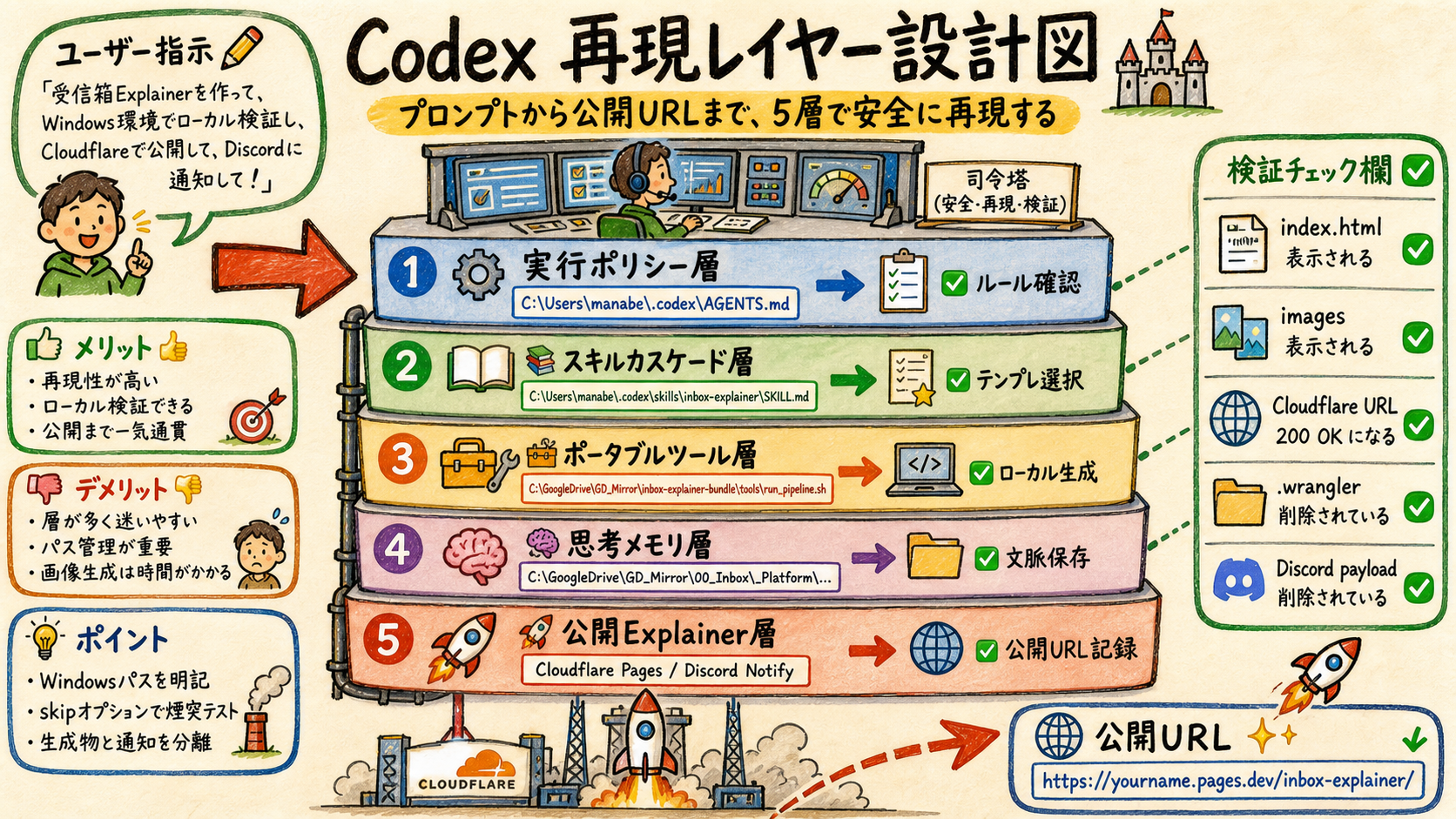
今回の再現対象は、単なる index.html 生成ではなく、Codex が次回以降も同じ判断で explainer を作れる状態です。
| Layer | Before | After |
|---|---|---|
| Runtime | trigger と path だけを登録 | AGENTS.md に 5 phase / 5 要素 / 7 meta-pattern / WSL 注意点まで常時注入 |
| Skill | inbox-explainer だけ導入 | inbox-explainer + run-explainer-page + run-ai-images の cascade と役割を明示 |
| Tools | OneDrive 固定パス依存 | bundle 直下 output と環境変数で portable 実行 |
| Thought | memory は repo 内にあるだけ | 運用哲学を Codex runtime doctrine と manifest に昇格 |
| Deploy | 元 bundle の紹介ページのみ | Codex 再現版を別 Cloudflare project として公開 |
📚 用語解説 — Runtime layer: Codex が毎回読む C:\Users\manabe\.codex\AGENTS.md のこと。ここに思想を短く入れると、skill を読む前の判断にも反映される。
🛠️ 運用方法: (1) AGENTS.md で trigger と doctrine を読む (2) skill で domain template を選ぶ (3) runner で local build (4) 画像生成と deploy (5) URL と .cf-deployed.txt を検証する。
⚠️ アンチパターン: repo を clone しただけで「再現完了」とみなすこと。思想・失敗回避・検証ゲートが runtime に入っていないと、次セッションで同じ品質に戻れない。
02Codex Runtime Doctrine — 毎回効く思想
5 phase と 5 要素を、作業前の判断に効く短い規約として AGENTS.md に置く。
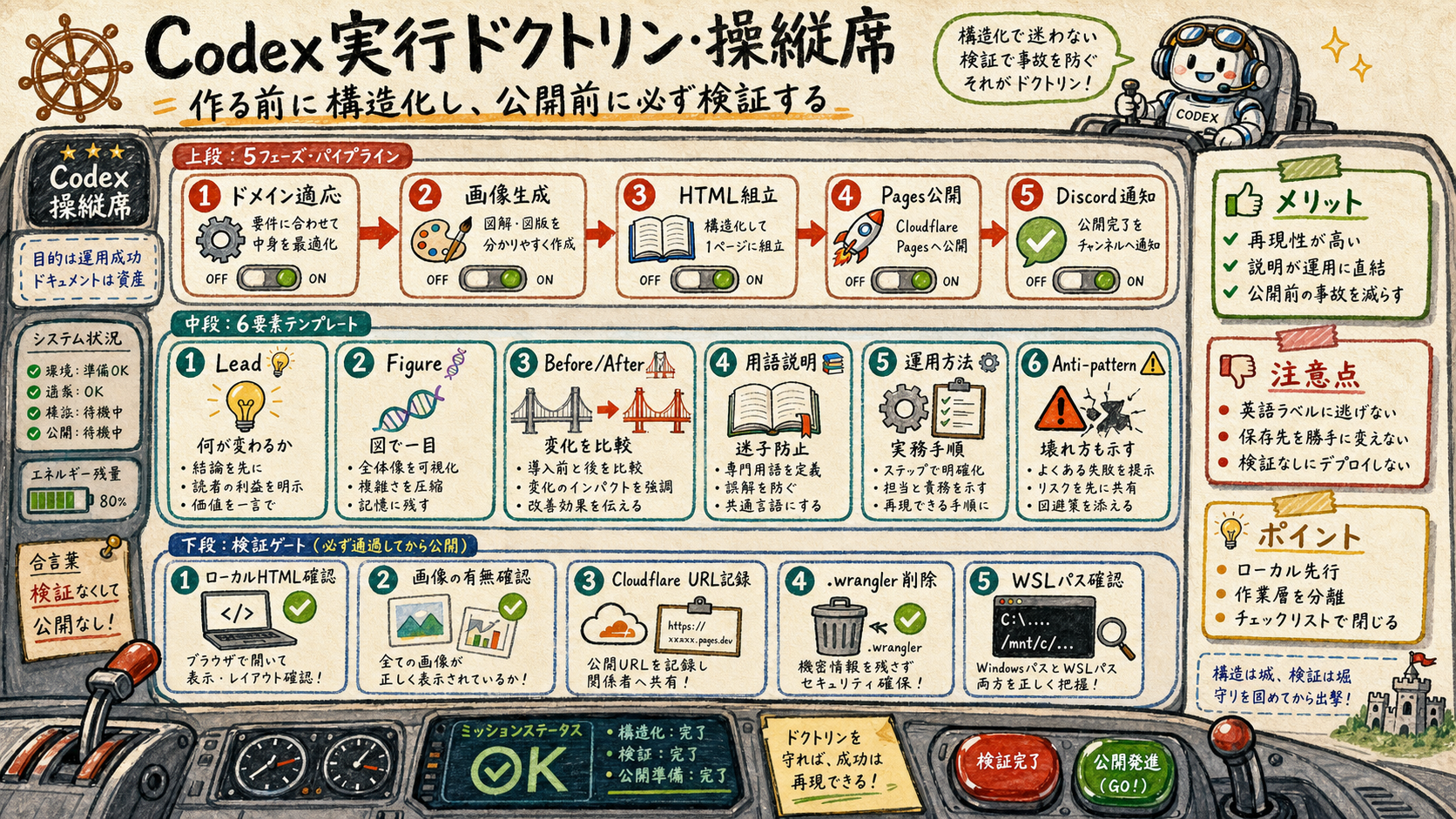
思想の中心は「読ませるページ」ではなく「使える説明レイヤー」です。各 section は、何が変わったか、どう使うか、どう壊れるかを必ず答えます。
| Rule | Before | After |
|---|---|---|
| Page purpose | 見栄えの良い紹介ページ | 運用に戻れる explainer layer |
| Section shape | 文章中心でばらつく | Lead / Figure / Before-After / 用語 / 運用 / アンチパターン |
| Execution | いきなり deploy | local smoke test -> build -> deploy |
| Windows handling | C:\ path と WSL path が混在 | shell は /mnt/c、報告は C:\ と使い分け |
| Prompt passing | argv に長文日本語 | stdin pipe で codex exec - |
📚 用語解説 — 5 要素テンプレ: Lead は文脈、Figure は直感、Before/After は変化、用語解説は理解、運用方法は実行、アンチパターンは事故防止を担当する。
🛠️ 運用方法: Codex が「explainer 化」を受けたら、まず domain を決め、outline を 5 要素で作り、local smoke test を通してから Cloudflare deploy へ進む。
⚠️ アンチパターン: hero copy や大きなカードで飾るだけのページにすること。inbox-explainer は landing page ではなく、意思決定と再利用のための運用面である。
03Portable Runner — Windows / WSL / Codex を吸収する
今回の修正で OneDrive 固定パスから外し、bundle checkout だけで local build できるようにした。
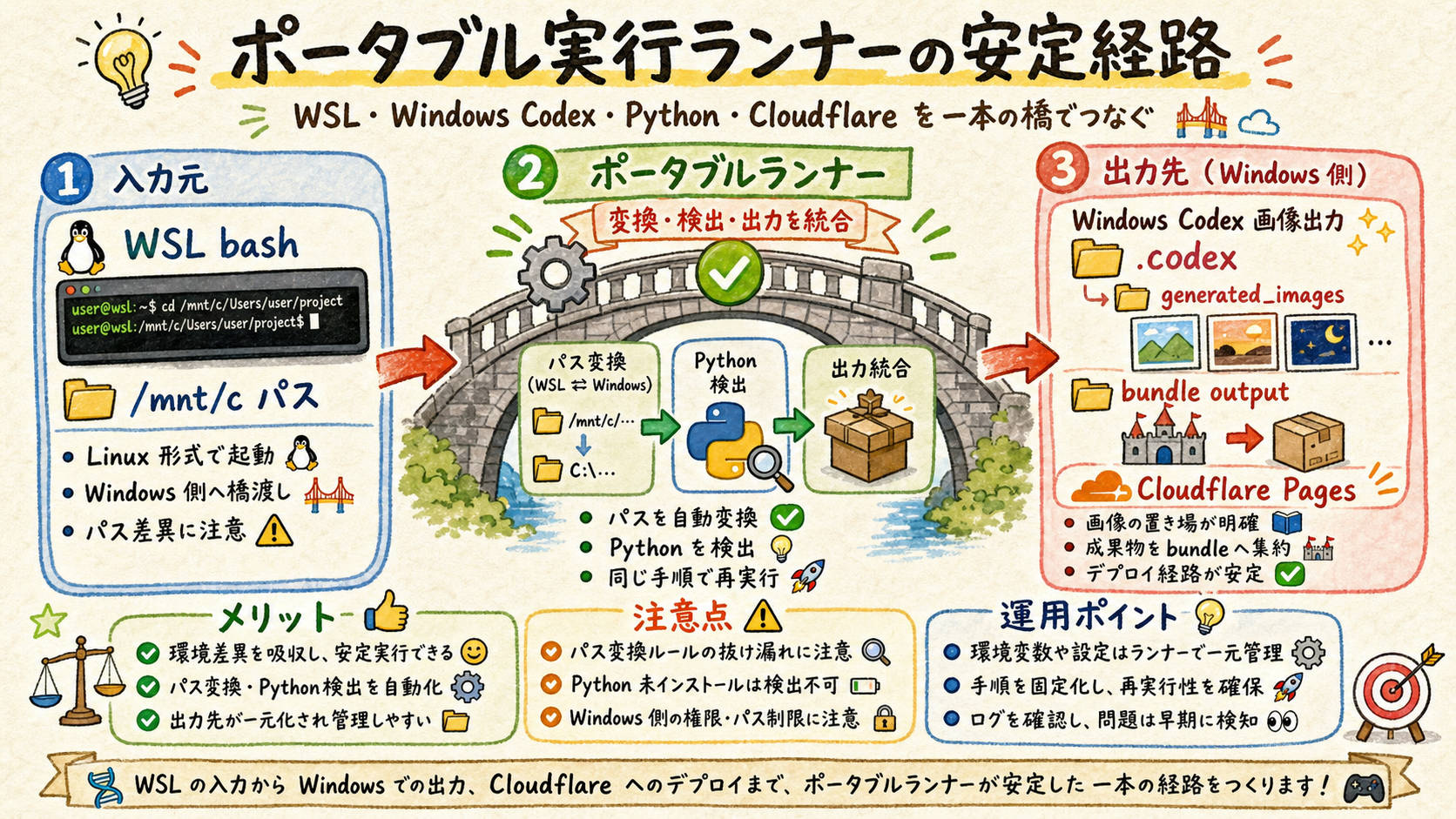
この環境では PowerShell から呼ぶ bash が WSL です。したがって実行コマンドは /mnt/c/...、ユーザーへ示すパスは C:\... に分けます。
| Concern | Before | After |
|---|---|---|
| Output path | C:/MS/OneDrive... 固定 | INBOX_EXPLAINER_OUTPUT_BASE または bundle/output |
| Skeleton path | .claude 配下固定 | bundle/skills/run-explainer-page/templates/skeleton.html |
| Python | python 固定 | python3 / python / python.exe を自動検出 |
| Codex binary | 手書き codex.cmd 固定 | CODEX_CMD または PATH から探索 |
| Image folder | Path.home() の .codex だけ見る | Windows codex.cmd なら /mnt/c/Users/manabe/.codex を探索 |
📚 用語解説 — stdin pipe: codex exec ... - に prompt を stdin で渡す方式。Windows の batch wrapper が長い日本語 argv を切る問題を避けるための必須パターン。
🛠️ 運用方法: まず --skip-images --skip-deploy --skip-discord で HTML assembly を確認する。画像生成を含める時だけ通常 run に戻す。
⚠️ アンチパターン: WSL の ~/.codex と Windows の C:\Users\manabe\.codex を同じものと誤認すること。Windows codex.cmd が生成した画像は Windows 側に保存される。
04Thought Layer — 7 meta-pattern を忘れない
5/10 の大規模セッションがうまくいった理由を、Codex の行動規範として残す。
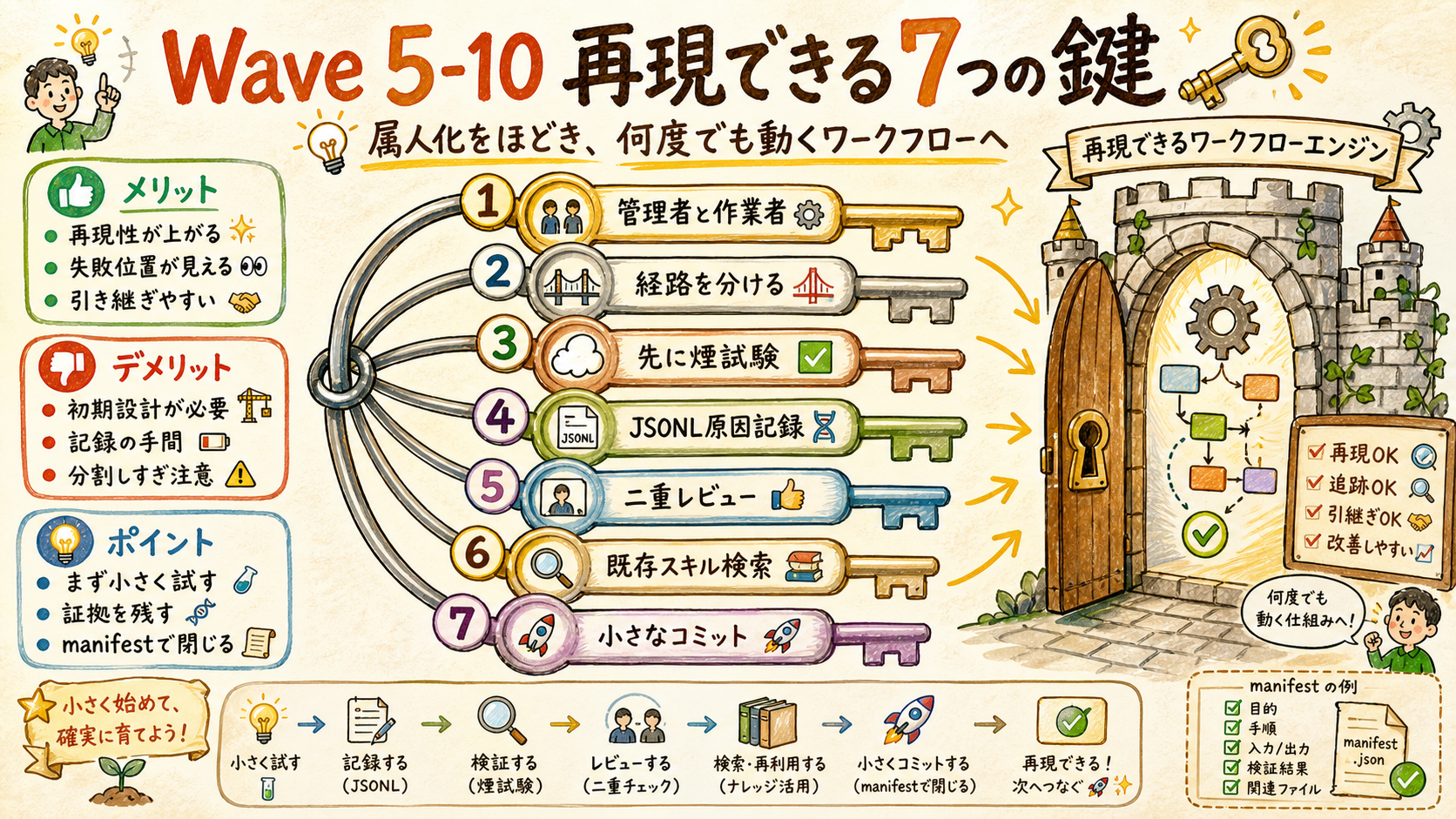
思想レイヤーは、Codex が「速く作る」だけでなく「事故らず再現する」ための操作原理です。特に bulk 生成時は Manager/Worker と disjoint path が品質を決めます。
| Meta-pattern | Before | After |
|---|---|---|
| Manager + Workers | 1 つの agent が全部抱える | 管理と実務を分け、Codex worker は限定範囲を処理 |
| Disjoint paths | 同じ folder に並列書き込み | write path を事前列挙し完全排他 |
| Smoke test first | 本番で初めて試す | 最小コマンドで CLI と path を確認 |
| JSONL root cause | 推測でリトライ | session JSONL を見て失敗原因を確定 |
| Dual review | 自己判断だけで完了 | Critic + Codex の二重レビューで共通指摘を修正 |
| Search existing skills | 自作で再発明 | 既存 skill / scripts を先に探索 |
| Small commits + manifests | 巨大変更をまとめる | phase ごとに manifest と履歴を残す |
📚 用語解説 — Disjoint path: 並列 worker ごとに書く folder/file を完全に分ける規律。OneDrive や Google Drive の同期 conflict を防ぐだけでなく、レビュー範囲も明確にする。
🛠️ 運用方法: 大きな explainer や複数 example を作る前に、write path 一覧、worker 役割、smoke test、verification ledger を先に書く。
⚠️ アンチパターン: 失敗した画像生成を根拠なしに何度も再実行すること。まず Codex session id と generated_images、必要なら session JSONL を確認する。
05Verification Gates — 完了条件を機械的にする
完全再現は、動いた気がする状態ではなく、確認済みの証跡で閉じる。
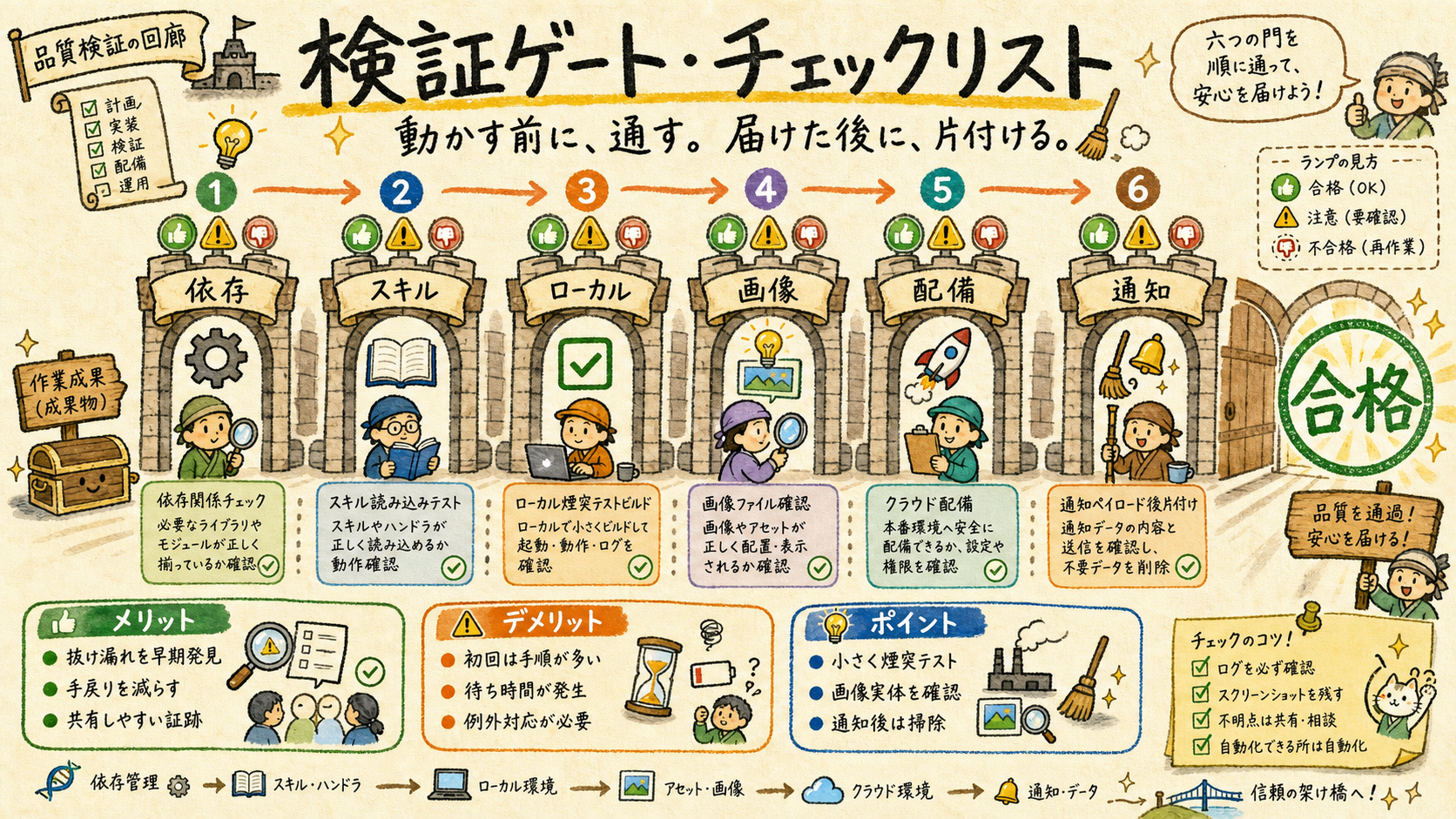
今回の Codex 再現では、local build、Codex skill read、deploy、cache cleanup までを別々に確認します。
| Gate | Check | Expected |
|---|---|---|
| Dependencies | codex / python / bash / wrangler | 利用可能 |
| Skill read | Codex が SKILL.md を読む | phase-count=5 |
| Local build | runner --skip-images --skip-deploy | index.html non-empty |
| Images | concept-NN-01.png | section figure と対応 |
| Deploy | wrangler pages deploy | Production URL と deployment URL |
| Cleanup | .wrangler と payload | cache 削除、payload 削除 |
📚 用語解説 — Completion gate: 作業完了を主観で決めず、ファイル存在・サイズ・URL・cleanup 状態のような観測可能な条件で判断する仕組み。
🛠️ 運用方法: deploy 前は Get-Item index.html と image 一覧を確認。deploy 後は .cf-deployed.txt を残し、.wrangler を削除する。
⚠️ アンチパターン: Cloudflare URL が出たことで満足して、local file と images の対応や .wrangler cleanup を確認しないこと。deploy は最終ゲートの 1 つにすぎない。
06Operating Commands — 次回そのまま使う
Codex 再現版は、作った後に再利用できて初めて完成。
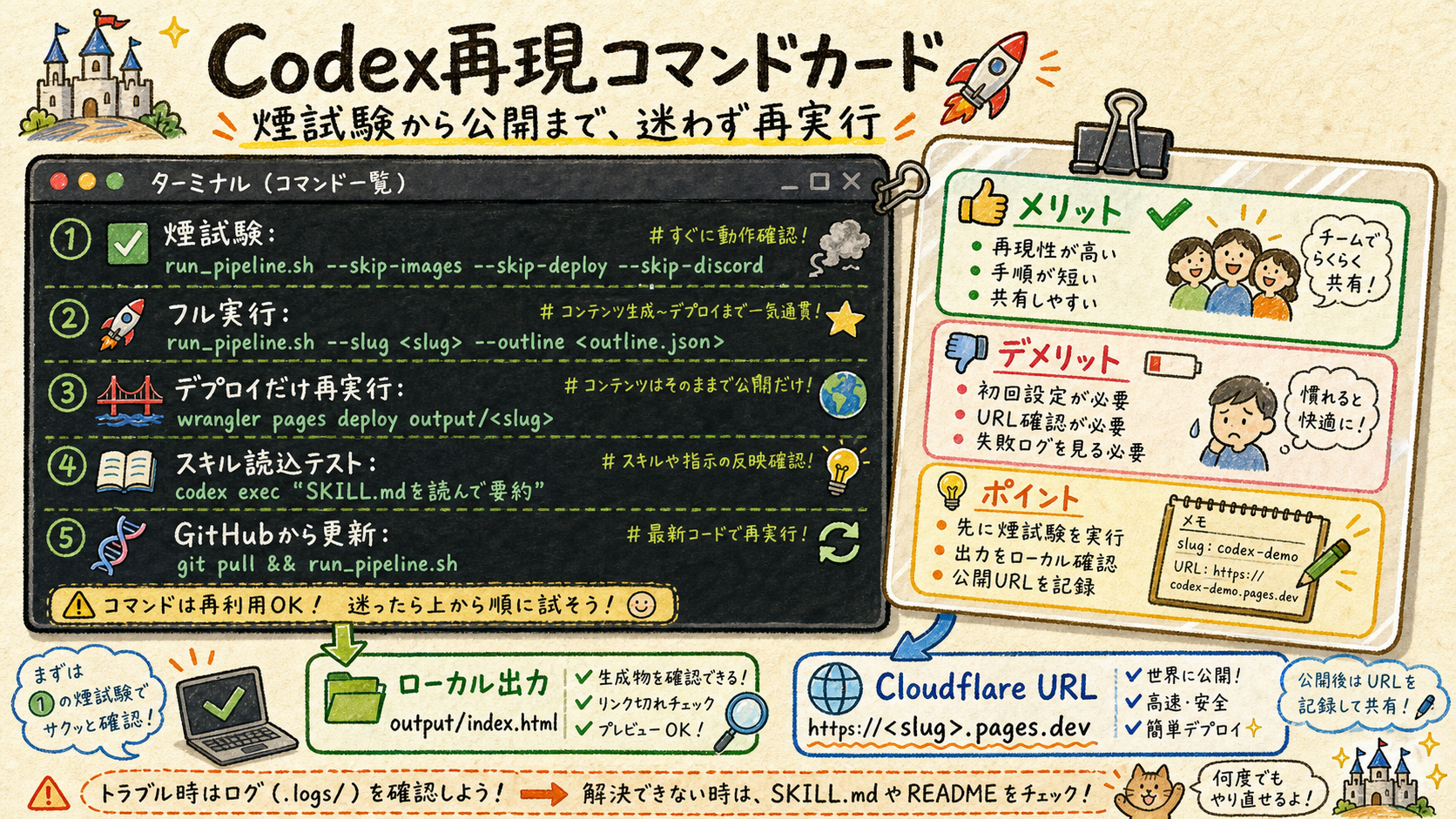
次回の起動時は、下のコマンドを入口にすれば同じ再現レイヤーへ戻れます。通常は smoke test から始め、公開時だけ deploy 付きで実行します。
# Local smoke test
bash /mnt/c/GoogleDrive/GD_Mirror/inbox-explainer-bundle/tools/run_pipeline.sh \
  --slug codex-repro-smoke \
  --outline /mnt/c/GoogleDrive/GD_Mirror/inbox-explainer-bundle/examples/codex-repro/outline.json \
  --skip-images --skip-deploy --skip-discord

# Full build + deploy
bash /mnt/c/GoogleDrive/GD_Mirror/inbox-explainer-bundle/tools/run_pipeline.sh \
  --slug codex-repro \
  --outline /mnt/c/GoogleDrive/GD_Mirror/inbox-explainer-bundle/examples/codex-repro/outline.json \
  --project inbox-explainer-codex-repro
📚 用語解説 — Deploy layer: 元 bundle の紹介ページとは別に、Codex での再現状態そのものを説明する Cloudflare Pages project。これは人間と AI の両方が次回の復帰に使う地図になる。
🛠️ 運用方法: 新しい domain example を作る時は examples/<slug>/outline.json を作り、同じ runner に渡す。思想を変える場合は docs/codex_reproduction_manifest.md と AGENTS.md の両方を更新する。
⚠️ アンチパターン: deployed HTML だけを最新にして、AGENTS.md や manifest を更新しないこと。公開レイヤーと runtime layer がずれると、次回の Codex が古い思想で動く。
結論
- 完全再現は、clone ではなく 5 層の同期: runtime policy / skill cascade / portable tools / thought memory / published layer。
- Codex 固有の補正として、WSL path と Windows codex.cmd の境界、stdin pipe、generated_images 探索先を runtime doctrine に入れた。
- 別レイヤーとして公開することで、人間にも Codex にも次回復帰しやすい再現地図になる。